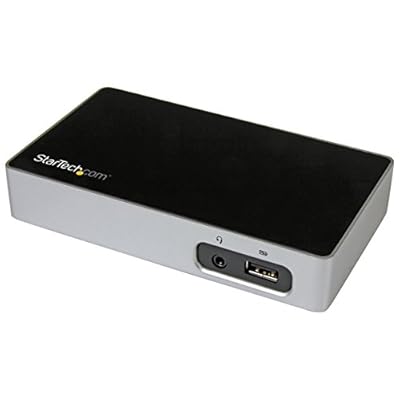

DVI Docking Station for Laptops - USB 3.0 - Universal Laptop Docking Station - DVI Laptop Dock USB3VDOCKD,Black & silver
توفر محطة إرساء DVI هذه لأجهزة الكمبيوتر المحمولة طريقة فعالة من حيث التكلفة لإنشاء محطة عمل أبسط ولكنها عالية الأداء.
DVI Docking Station for Laptops - USB 3.0 - Universal Laptop Docking Station - DVI Laptop Dock USB3VDOCKD,Black & silver

DVI Docking Station for Laptops - USB 3.0 - Universal Laptop Docking Station - DVI Laptop Dock USB3VDOCKD,Black & silver

غير متوفر في المخزون
أمريكا مستورد من متجر USA
أفضل شركائنا اللوجستيين
  • fedex
  • dhl
توفر محطة إرساء DVI هذه لأجهزة الكمبيوتر المحمولة طريقة فعالة من حيث التكلفة لإنشاء محطة عمل أبسط ولكنها عالية الأداء.
كفالة يو كير:
لا شيء
اختر الباقة
fast shipping

شحن
سريع

free return

استرجاع
مجاني*

تغليف آمن

تغليف آمن

منتجات أصلية %100

منتجات أصلية %100

pci-dss

الامتثال لمعيار PCI DSS

iso certified

حاصل على شهادة ISO 27001


paypal payment
visa payment
mastercard payment
Note: Step Down Voltage Transformer required for using electronics products of أمريكا store (110-120). Recommended power converters اشتري الآن.

مايفيد

التوافق العالمي
تدعم محطة الإرساء هذه مجموعة واسعة من أجهزة الكمبيوتر المحمولة وأنظمة التشغيل، مما يضمن التكامل السلس والتنوع للمستخدمين الذين يحتاجون إلى اتصالات متعددة بالأجهزة.
منافذ متعددة
مزود بمنافذ USB 3.0 المتنوعة ومخرج DVI والمزيد، مما يسمح بالاتصال المتزامن للعديد من الأجهزة الطرفية، مما يعزز الإنتاجية للمحترفين ومتعددي المهام على حد سواء.
أداء عالي الجودة
مع دعم إخراج الفيديو بدقة 1080 بكسل، فإنه يوفر صورًا واضحة وإمكانيات عالية الأداء للعروض التقديمية ومهام الوسائط المتعددة، وهو مثالي للاستخدام التجاري وإنشاء المحتوى.

تفاصيل المنتج

Shop DVI Docking Station for Laptops - USB 3.0 - Universal Laptop Docking Station - DVI Laptop Dock USB3VDOCKD,Black & silver online at a best price in لبنان. B013TPIC4S
العلامة التجاريةStarTech-com
اللونالأسود والفضي
واجهة الأجهزةUSB 3.0
الأجهزة المتوافقةApple MacBook Air M1 / M2 و Apple MacBook Pro 13 M1 / M2 و Apple MacBook Pro 14 M1 Pro / M2 Pro و Apple MacBook Pro 16 M1 Pro / M2 Pro / M2 Max و Apple MacBook Pro 15 2019/2018/2017/2016 ، Apple MacBook Pro 1 Apple MacBook Pro 16 2021 M1 Pro / M1 Max، HP Spectre x360 13-aw0000 / 13-df000/13-af000 / 13-ap000 / 13-ba0000 / 14-ea0000 / 14-c3B5G2AV ، HP EliteBook 830 G7 Intel / AMD ، HP EliteBook 830 G8 Intel / AMD ، HP EliteBook 840 G7 Intel / AMD ، HP EliteBook 840 G8 Intel / AMD ، HP EliteBook 850 G8 Intel / AMD ، HP13-dq0000 / 13-cb0000 / 14-bd0000 / 14-ce000 ... شاهد المزيد
إجمالي منافذ USB3
عدد الموانئ3
وزن العنصر12.32 أونصة ( 349.27 جرام )
القوة الكهربائية20
رقم تعريف التجارة العالمية00065030861816
UPC065030861816

من يجب أن يشتري؟

Suitable For
  • المسافرين الدائمين

    مثالي للمستخدمين الذين يحتاجون إلى محطة إرساء مدمجة لتعزيز الإنتاجية أثناء التنقل باستخدام منافذ متعددة.

  • عمال المكاتب

    مثالي للمحترفين الذين يحتاجون إلى شاشات وأجهزة طرفية متعددة متصلة بالكمبيوتر المحمول الخاص بهم لتحسين سير العمل.

  • عشاق التكنولوجيا

    ممتاز للمستخدمين الذين يحتاجون إلى التنوع في خيارات الاتصال لمختلف الأجهزة، مما يعزز تجربة الحوسبة الشاملة.

Not Suitable For
  • مستخدمي الألعاب

    قد لا يدعم احتياجات الألعاب عالية الأداء بسبب إخراج الرسومات المحدود والتأخير المحتمل مع شاشات العرض المتعددة.

وصف المنتج

DVI Docking Station for Laptops - USB 3.0 - Universal Laptop Docking Station - DVI Laptop Dock USB3VDOCKD,Black & silver

هل لديك أي استفسار؟ تحدث معنا

أسئلة وأجوبة العملاء

  • سؤال: What are the key features of the StarTech.com DVI Docking Station for Laptops?

    إجابه: The StarTech.com DVI Docking Station features USB 3.0 connectivity, providing fast data transfer rates. It supports DVI output, allowing you to connect multiple monitors for enhanced productivity. With a universal design, this docking station is compatible with a variety of laptop brands, making it versatile for any setup. Additionally, it includes multiple USB ports for connecting peripherals such as keyboards and mice, making it ideal for both home and office environments.
  • سؤال: How do I set up the StarTech.com DVI Docking Station?

    إجابه: Setting up the StarTech.com DVI Docking Station is straightforward. Simply connect the docking station to your laptop using the USB 3.0 cable. Once connected, install any necessary drivers that may be prompted by your operating system. After installation, you can plug in your DVI monitor and peripherals. This setup is perfect for users who need to quickly transition from a mobile to a desktop experience, providing a seamless continuity in workflow.
  • سؤال: Can I use the DVI Docking Station with a Mac laptop?

    إجابه: Yes, the StarTech.com DVI Docking Station is compatible with Mac laptops. However, users may need to install specific drivers to ensure full functionality. This compatibility allows Mac users to expand their display options or easily connect additional devices. For those using design software or multitasking extensively, this docking station provides a dual-monitor setup that enhances productivity and improves workflow efficiency.
  • سؤال: What monitors are compatible with the DVI output of this docking station?

    إجابه: The DVI output of the StarTech.com DVI Docking Station is compatible with any monitor that has a DVI input, including DVI-D and DVI-I types. This wide compatibility ensures that you can connect a range of monitors for different applications. Whether you’re using a single monitor for general tasks or a dual-monitor setup for professional work, this docking station adapts to your needs and supports high-resolution displays, providing crisp and clear visuals.
  • سؤال: Does the StarTech.com DVI Docking Station support audio output?

    إجابه: The StarTech.com DVI Docking Station does not support audio output via DVI, as DVI primarily transfers video data. If you require audio functionality, consider using additional audio outputs on your laptop or employing external speakers connected directly to the docking station or your monitor. This setup is ideal for users focused on video performance, such as graphic designers, while still needing a reliable solution for audio through other channels.
  • سؤال: Can multiple monitors be connected to the StarTech DVI Docking Station?

    إجابه: Yes, you can connect multiple monitors to the StarTech.com DVI Docking Station, however, typically one monitor will use the DVI port while additional monitors can utilize USB connections, depending on your operating system's capabilities. This flexibility allows for a multi-display setup that enhances your workspace efficiency. Ideal for professionals who work with extensive data sets, coding, or creative projects, it enables easy navigation between applications.
  • سؤال: Is the StarTech.com DVI Docking Station backward compatible with USB 2.0?

    إجابه: Absolutely, the StarTech.com DVI Docking Station is backward compatible with USB 2.0 ports. While using a USB 3.0 connection will yield optimal performance in terms of data transfer speeds, connecting it to a USB 2.0 port will still function, although at reduced speeds. This backward compatibility ensures that you can use the docking station with older devices without needing to upgrade your hardware immediately, providing flexibility in device use.
  • سؤال: What operating systems are supported by the StarTech.com DVI Docking Station?

    إجابه: The StarTech.com DVI Docking Station supports multiple operating systems, including Windows and macOS. It is advisable to check the specific driver compatibility for your OS version on the StarTech website. This support allows users across different platforms to leverage a universal docking solution that enhances their laptop capabilities, making it suitable for both casual users and professionals working in varied computing environments.
  • سؤال: How does the StarTech.com DVI Docking Station improve my workstation setup?

    إجابه: The StarTech.com DVI Docking Station enhances your workstation setup by providing connectivity options for multiple devices, allowing for greater organization and efficiency. It helps streamline your workspace by reducing cable clutter while offering the capability to easily connect your laptop to external displays and peripherals. This is particularly beneficial for users engaging in tasks requiring extensive multitasking, such as financial analysis or graphic design, where real estate on your screen is essential.
  • سؤال: Where can I buy the StarTech.com DVI Docking Station in Lebanon?

    إجابه: You can buy the StarTech.com DVI Docking Station for Laptops at Ubuy in Lebanon. Ubuy offers a convenient online shopping experience, allowing you to explore various options and ensure secure purchase. They provide detailed product information, helping you make an informed decision for your workspace needs.

StarTech.com Docking Stations مراجعة تحريرية

لم يتم العثور على مراجعات تحريرية

مراجعات العملاء وتقييماتهم

1 تقييمات العملاء
  • 5 نجمة
    100%
  • 4 نجمة
    0%
  • 3 نجمة
    0%
  • 2 نجمة
    0%
  • 1 نجمة
    0%

أضف تقييم لهذا المنتج

شارك أفكارك مع عملاء آخرين

إيجابيات

  • دعم عرض متعدد
  • اتصالات USB 3.0 سريعة
  • سهولة الإعداد والتثبيت
  • تصميم مدمج ومحمول
  • التوافق العالمي مع أجهزة الكمبيوتر المحمولة

سلبيات

  • خيارات إخراج الصوت محدودة.

منصة موثوقة وثقة كاملة للمشتري

MA
Mohammad
مشتري موثّق

“Excellent quality and original too,when ubuy send original things I will appreciate that ,I very satisfied thank you”

23 July 2026 · عبر Trustpilot
CK
Chitra
مشتري موثّق

“The order and delivery progress was communicated very well. Package arrived within the estimated time. Products arrived as expected in good condition.”

22-Jul-26 · عبر Trustpilot
K
kund
مشتري موثّق

“Good supply of products. Safe payment methods, and shipment worldwide! Genuine products.”

23-Jul-26 · عبر Trustpilot
OO
Onesi
مشتري موثّق

“Was my first time buying a product from Ubuy, but I found it so helpful. This is reliable. Gonna place a new order!”

22 July 2026 · عبر Trustpilot
SJ
SAO JOHN
مشتري موثّق

“Ubuy is a great online platform to buy stuff. Reliable, fast delivery time and great value for money. I've been using Ubuy online shopping platform for three years now and will continue to do so.”

23 July 2026 · عبر Trustpilot
الخروج الآمن شحن عالمي إسترجاع سهل منتجات أصلية

معلومات مهمة

  • القيود: بالنسبة للمنتجات التي يتم شحنها دولياً، يُرجى ملاحظة أن أي ضمان من الشركة المصنعة قد لا يكون صالحاً؛ قد لا تتوفر خيارات خدمة الشركة المصنعة؛ قد لا تكون أدلة المنتج والتعليمات وتحذيرات السلامة مكتوبة بلغة بلد المقصد؛ قد لا يتم تصميم المنتجات (والمواد المصاحبة لها) وفقاً لمعايير بلد الوجهة والمواصفات ومتطلبات الملصقات؛ وقد لا تتوافق المنتجات مع الجهد الكهربي المستخدم في بلد الوجهة والمعايير الكهربائية الأخرى (تتطلب استخدام محوّل كهربي أو جهاز تحويل إذا كان ذلك مناسباً). المستلم مسؤول عن ضمان إمكانية استيراد المنتج بشكل قانوني إلى بلد الوجهة. عند الطلب من يوباي أو الشركات التابعة لها، يكون المستلم هو المستورد المسجل ويجب أن يلتزم بجميع القوانين واللوائح الخاصة ببلد الوجهة.
  • ليست كل المنتجات المدرجة على يوباي معروضة للبيع، لأن يوباي هو محرك بحث عالمي. المنتجات تخضع للوائح التصدير / التجارة.