0 ratings


Item #:
53256786
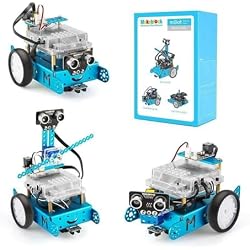
Makeblock mBot Robot Kit + Servo Pack Robot Add-on Pack
Item #:
53256786
USD 119
Price Details
Excluding Shipping & Custom charges ( Shipping and custom charges will be calculated on checkout )
*All items will import from US
4%
0 ratings
Write a review
In stock
 Imported from USA store
Secured transaction
Ubuy works hard to protect your security and privacy. Our advanced payment security system ensures confidentiality by encrypting your information during transmission using AES (Advanced Encryption Standards) and SSL (Secure Socket Layer) protocols. Your payment details are 100% secure as we do not share your payment details with third party sellers.
Our Top Logistics Partners


Transform your mBot into a Dancing, Head-Shaking, or Light-Emitting cat with the Servo Add-On Pack.
This bundle contains 2 items


Fast
Shipping

Free
Return*

Secure Packaging

100% Original Products

PCI DSS Compliance

ISO 27001 Certified


Note: Step Down Voltage Transformer required for using electronics products of US store (110-120). Recommended power converters Buy Now.


What Stands Out
Educational Focus
Designed for kids, the mBot Robot Kit fosters learning in coding and robotics through hands-on projects, enhancing STEAM education in a fun and engaging way.
Expandable Design
The Servo Pack Add-on enhances the base kit, allowing customization and creativity. Kids can modify their robots, encouraging critical thinking and problem-solving skills.
User-Friendly Interface
With intuitive programming options, including drag-and-drop coding, users of all ages can easily create robotic functions, promoting a seamless learning experience for beginners.
Product Details
- 【𝐒𝐡𝐚𝐩𝐞 𝐘𝐨𝐮𝐫 𝐦𝐁𝐨𝐭 𝐖𝐢𝐭𝐡 𝐍𝐞𝐰 𝐋𝐨𝐨𝐤】Servo add-on pack is a 3-in-1 robot pack, you can transform your mBot to "Dancing Cat", "Head-Shaking Cat", "Light-Emitting Cat" or anything you can imagine.
- 【𝐄𝐚𝐬𝐲 𝐓𝐨 𝐔𝐬𝐞】The instruction included will teach you how to assemble it with mBot within 10 minutes easily.
- 【𝐅𝐫𝐞𝐞 𝐀𝐩𝐩 𝐓𝐨 𝐂𝐨𝐧𝐭𝐫𝐨𝐥】It is easily to control it or learn graphical programming via the mBlock Blockly App (iOS/Android) and The advanced mBlock software (Windows/MacOS/Linux/Chrome), rich online tutorials will be provided.
- 【𝐄𝐱𝐩𝐥𝐨𝐫𝐞 𝐔𝐧𝐥𝐢𝐦𝐢𝐭𝐞𝐝 𝐅𝐮𝐧】Be perfectly compatible with mBot/mBot Ranger, Makeblock platform building parts and other major building blocks pieces.
- 【𝐇𝐢𝐠𝐡 𝐐𝐮𝐚𝐥𝐢𝐭𝐲 𝐀𝐧𝐝 𝐒𝐚𝐟𝐞 𝐅𝐨𝐫 𝐊𝐢𝐝𝐬】Aluminum extrusion, anodized surface. A perfect gift for your kids and friends.
| Brand Name | Makeblock |
| Age Range Description | Kid |
| Manufacturer Maximum Age (MONTHS) | 144 |
| Manufacturer | Makeblock |
| Educational Objective | Construction Skills |
| Power Source | battery |
| Supported Battery Types | Batteries required |
| Operation Mode | Manual and Automatic |
| Indoor Outdoor Usage | Indoor |
| Theme | Robot |
| Item Weight | 3 lbs (1.36 kg) |
Who Should Buy?

-
STEM Education
Ideal for schools and educators focusing on teaching programming, robotics, and engineering concepts to students.
-
Beginners in Robotics
Great for beginners looking to explore robotics through a user-friendly platform with ample online resources.
-
Hobbyists and Tinkerers
Perfect for DIY enthusiasts wanting to experiment with robotics and coding in a fun, hands-on manner.

-
Advanced Programmers
Not suitable for experienced programmers seeking complex, high-level robotics projects beyond basic functionalities.
Product Description
Have any Query? Chat with us
Customer Questions & Answers
-
Question:
What is the Makeblock mBot Robot Kit?
Answer: The Makeblock mBot Robot Kit is an educational robot designed for beginners. It's used to teach programming, robotics, and STEM concepts through hands-on experience. With its modular design, users can assemble various components, enhancing creativity and problem-solving skills. This kit is perfect for kids or adults looking to dive into robotics, offering a platform for learning coding through intuitive programming languages like Scratch and Arduino. -
Question:
What is included in the Servo Pack Robot Add-on Pack?
Answer: The Servo Pack Robot Add-on Pack includes additional servo motors and various components to enhance your mBot. These servos allow for more advanced movements and functionalities, making your robot more dynamic and responsive. This add-on is ideal for those who want to build more complex projects, such as robotic arms or moving platforms, thereby expanding the capabilities of the original mBot kit. -
Question:
How do I program the mBot Robot?
Answer: Programming the mBot Robot can be done using either the mBlock software or Arduino IDE. The mBlock software utilizes a drag-and-drop interface based on Scratch, making it accessible for beginners. Users can easily create custom programs and upload them to the mBot, enabling it to execute specific tasks. This programming approach provides a foundation for understanding coding concepts while engaging with interactive robot commands. -
Question:
Can I use the mBot Robot for competitions?
Answer: Yes, the mBot Robot is suitable for various robotics competitions and challenges, such as coding contests or STEM-focused events. Its customizable features and the ability to integrate additional components, like the Servo Pack, allow participants to innovate and optimize their robots to meet specific competition criteria. This flexibility encourages creativity and strategic thinking, making the mBot a popular choice among competitors. -
Question:
What age group is the mBot Robot Kit suitable for?
Answer: The Makeblock mBot Robot Kit is designed for a broad age range, typically catering to individuals aged 8 and up. Its user-friendly interface, along with the extensive educational resources provided, makes it an effective learning tool for both children and adults venturing into the world of robotics. It's excellent for classrooms, home education, and independent learning, fostering a passion for science and technology. -
Question:
What skills can I learn using the mBot Robot Kit?
Answer: Using the mBot Robot Kit, users can develop a variety of skills, including coding, problem-solving, critical thinking, and basic electronics. By engaging with different programming challenges and building projects, users enhance their technical knowledge and gain practical experience in robotics. These skills not only lay the groundwork for future learning in technology and engineering but also encourage teamwork and collaboration when working with peers. -
Question:
Is the mBot compatible with other Makeblock products?
Answer: Yes, the mBot is fully compatible with other Makeblock products, allowing users to expand their projects and functionalities. This interconnectivity makes it possible to integrate additional sensors, motors, and components, fostering creativity and innovation in robotics projects. Whether you're building elaborate systems or simple attachments, the compatibility with other Makeblock accessories enhances the overall learning experience. -
Question:
What programming languages can I use with mBot?
Answer: The mBot supports two primary programming languages: Scratch and Arduino C. Scratch is ideal for beginners due to its visual interface, allowing users to create programs through block-based coding. Those looking for more advanced options can utilize Arduino C to write code directly, providing greater control over the robot’s functionality. This dual-language support caters to different skill levels, making it approachable for everyone. -
Question:
How can I troubleshoot issues with my mBot?
Answer: If you encounter issues with your mBot, first ensure all components are properly connected and powered. Check the software for any programming errors or compatibility issues. The Makeblock forum and community sites provide valuable resources and troubleshooting tips from fellow users. Additionally, reviewing the user manual can aid in identifying common problems and solutions, ensuring a smoother experience with your robot. -
Question:
Where can I buy the Makeblock mBot Robot Kit and Servo Pack Robot Add-on Pack in Lebanon?
Answer: You can purchase the Makeblock mBot Robot Kit and Servo Pack Robot Add-on Pack from Ubuy in Lebanon. Ubuy offers a streamlined shopping experience with a wide selection of Makeblock products, making it easy to find what you need. Their platform provides reliable information on product availability and customer reviews, ensuring that you can make an informed decision about your purchase.
Makeblock Science Kits & Toys Editorial Review
No editorial reviews found
Customer Reviews & Ratings
3 customers ratings
-
5 Star
65%
-
4 Star
35%
-
3 Star
0%
-
2 Star
0%
-
1 Star
0%
Review this product
Share your thoughts with other customers
Platform Trust & Buyer Confidence

MA
Mohammad
Verified buyer
“Excellent quality and original too,when ubuy send original things I will appreciate that ,I very satisfied thank you”
23 July 2026 · via Trustpilot
CK
Chitra
Verified buyer
“The order and delivery progress was communicated very well. Package arrived within the estimated time. Products arrived as expected in good condition.”
22-Jul-26 · via Trustpilot
K
kund
Verified buyer
“Good supply of products. Safe payment methods, and shipment worldwide! Genuine products.”
23-Jul-26 · via Trustpilot
OO
Onesi
Verified buyer
“Was my first time buying a product from Ubuy, but I found it so helpful. This is reliable. Gonna place a new order!”
22 July 2026 · via Trustpilot
SJ
SAO JOHN
Verified buyer
“Ubuy is a great online platform to buy stuff. Reliable, fast delivery time and great value for money. I've been using Ubuy online shopping platform for three years now and will continue to do so.”
23 July 2026 · via Trustpilot
Secure Checkout
Global Delivery
Easy Returns
Genuine Products
Related Categories
Related Brands
Product Price History
Important information
- Limitations : For products shipped internationally, please note that any manufacturer warranty may not be valid; manufacturer service options may not be available; product manuals, instructions, and safety warnings may not be in destination country languages; the products (and accompanying materials) may not be designed in accordance with destination country standards, specifications, and labeling requirements; and the products may not conform to destination country voltage and other electrical standards (requiring use of an adapter or converter if appropriate). The recipient is responsible for assuring that the product can be lawfully imported to the destination country. When ordering from Ubuy or its affiliates, the recipient is the importer of record and must comply with all laws and regulations of the destination country.
- Not all the products listed on Ubuy are for sale, as Ubuy is a global search engine. Products are subject to export/trade regulations.
USD 119
Order now and get it around Monday, August 10
This item is not restrict in my country.(Please click on above link if this item is not restrict in your country, So our team will review and allow.)
QTY:
Secured transaction
PCI DSS compliant and ISO 27001:2022 certified, with encrypted payments and full buyer protection on every order.
Our Top Logistics Partners
Fastest cross-border delivery
Features & Benefits
- Easy to assemble.
- Compatible with mBot and other building block pieces.
- Compatible with mBlock Blockly App and Software.
- Includes online tutorials.
- Made of high-quality aluminum extrusion with anodized surface.
- A perfect gift for kids and friends.
Ubuy Assurance
Experience worry-free shopping with 100% original products, PCI DSS-compliant payment security, ISO 27001-certified data protection, the fastest cross-border delivery, free returns *, and secure packaging on every order.